Skills Matrix
Skills Matrix Template, Free to Download for Excel
A skills matrix shows who in your team can do what, and how well, so you can see the gaps before an auditor or an incident finds them. Fill in the short form below to download our free skills matrix template, then rate your people against the skills your work needs and any gap turns red. CheckSafe has been building competency and training software for New Zealand's high-risk industries since 2022, and this template uses the same rating scale as our guide to creating a skills matrix.
What is a skills matrix?
A skills matrix is a grid that rates each person against the skills their work needs, so strengths and gaps show up at a glance. People run down the side and skills run across the top, from safety training and equipment operation to the certifications a role must hold. Each cell holds a level, so reading across a row shows everything one person can do, and reading down a column shows who you can send to a particular job. In CheckSafe the same grid becomes a live skills matrix you can filter by person, team or competency, and our skills matrix explainer covers the benefits in more detail.

How is a skills matrix different from a training matrix?
A training matrix lists the formal training each role needs, while a skills matrix rates how capable each person actually is at the work. Most safety-critical businesses need both. The training matrix tells you which tickets and courses a forklift operator must hold, and the skills matrix tells you whether the person on tomorrow's roster can do the job safely on their own. If you need the first one, our free training matrix template is built from a real New Zealand civil and logistics workforce and pairs with this one.
How CheckSafe helps
What is in the free skills matrix template?
The template has three sheets: the skills matrix itself, the rating scale, and a short guide to filling it in.
•The skills matrix sheet
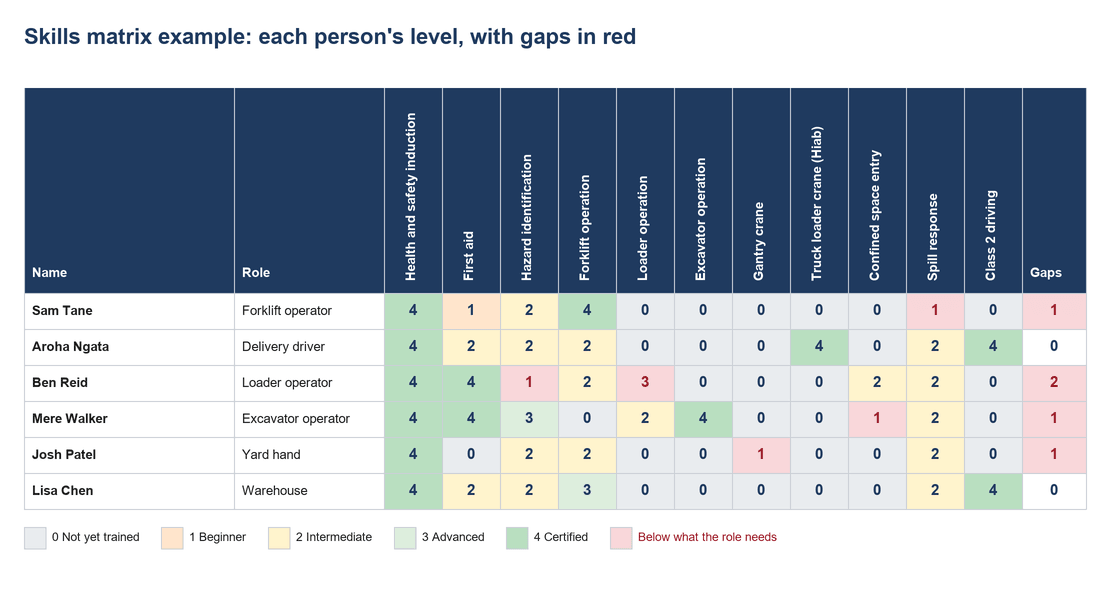
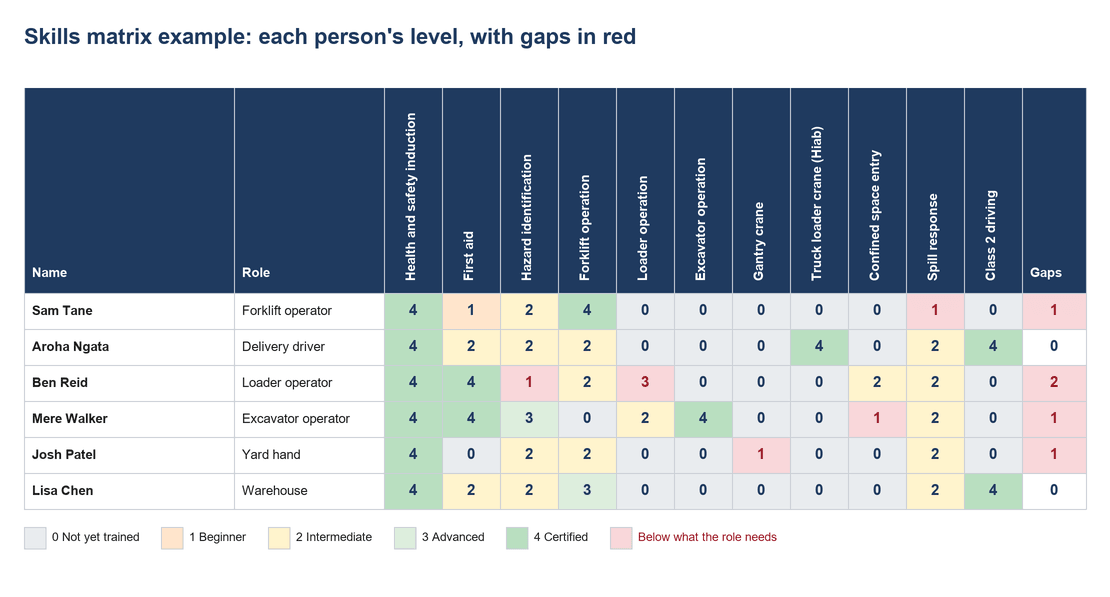
The skills matrix sheet has two tables. The top one sets the minimum level each role needs for each skill, and the bottom one holds each person's current level. Any rating below what that person's role needs turns red, and a Gaps column counts them for you.
•The example skills
The example skills come from a real New Zealand civil and logistics training matrix: health and safety induction, first aid, hazard identification, forklift, loader and excavator operation, gantry crane, truck loader crane, confined space entry, spill response and Class 2 driving. The six example roles run from forklift operator to delivery driver, and the example people are made up.
•The rating scale and how-to sheets
The rating scale and how-to sheets explain each level and walk through the five steps further down this page.
It is built in Excel, opens in Google Sheets, and has room for 60 people and ten roles. Change the skills and roles to match your business and the rest follows.
Matrix Example
What does a skills matrix example look like?
Here is the template with six example people filled in, rated on skills taken from a real New Zealand civil and logistics workforce.
How to rate skills
How do you rate skills in a skills matrix?
Use one scale for everyone, so a 2 means the same thing on every site and in every team. The template uses the four levels from our guide, plus a zero for anyone not yet trained:
0 Not yet trained:
has not done the training or been assessed.
1 Beginner:
has limited knowledge and needs supervision.
2 Intermediate:
can do the task on their own.
3 Advanced:
works at an expert level and can train and supervise others.
4 Certified:
holds the official certification or meets the compliance standard for the task.
The line between 1 and 2 matters most on a high-risk site. WorkSafe's guidance is that workers should either have enough knowledge or experience of the work or be supervised by someone who does, and anyone rated 1 sits on the supervised side of that line. For ticketed work, Certified usually means a recognised qualification such as an NZQA unit standard.
How it works
How do you create a skills matrix?
List the skills, set what each role needs, rate your people honestly, then act on the red cells and keep it current.
1. List the skills
List the skills your work needs, from technical skills and safety training to equipment operation and the certifications each job requires.
2. Enter minimum level
In the role targets table, enter the minimum level each role needs for each skill, using 0 where a role does not need it.
3. Rate from 0 to 4
Rate each person from 0 to 4, using supervisor checks, assessments and certificates rather than guesswork.
4. Act on the red cells
Act on the red cells: book the training, pair the person with someone rated 3 or above, or keep them supervised until they are assessed.
5. Regular matrix reviews,
Review the matrix regularly, and update it whenever someone finishes training, changes role or renews a certificate.
CheckSafe's own setup starts the same way: we help each new customer build their skills matrix into one competency framework before we load their people, roles and assessments.

The matrix
When does a skills matrix outgrow a spreadsheet?
Usually when nobody has time to keep the ratings current, or when the people, sites and skills no longer fit on one screen. That is when a red cell sits unnoticed until someone is sent to do a job they are not ready for. CheckSafe keeps a live skills matrix that updates as managers sign off assessments in the field on the mobile app, and you can filter it by person, team or competency to see exactly where the gaps are. Plenty of the teams who come to us have already tried an overseas provider and were not happy with it. CheckSafe is designed, built and supported here in New Zealand, and most teams are up and running inside a month.
Questions about skills matrices
What should a skills matrix include?
Every role you employ, every skill or certification those roles need, the minimum level each role requires, and each person's current level against those skills. The useful extras are the date each rating was last checked, who checked it, and where the evidence sits, such as a certificate or a signed-off assessment, because a rating nobody can back up will not satisfy an auditor or a client. Keep the skills specific: "excavator operation" tells you far more than "plant", and "confined space entry" far more than "safety". If you work with contractors, include them too, because the person on site needs the right skills whoever employs them. The template already covers roles, skills, minimum levels and current ratings, and you can add columns for the rest.
What rating scale should a skills matrix use?
Pick one scale and use it everywhere, so a rating means the same thing on every site. A simple scale of four or five levels works best, because supervisors can apply it consistently without needing a course of their own. The template uses 0 for not yet trained, 1 for beginner, 2 for intermediate, 3 for advanced and 4 for certified, which lines up with the question that matters most on a high-risk site: can this person do the job on their own, or do they still need supervision? Avoid percentages and ten-point scales, which suggest more precision than anyone can really judge, and write a one-line definition for each level so two supervisors would give the same person the same score.
How often should we update a skills matrix?
Update it every time something changes, and review the whole matrix on a regular cycle as well. The changes that matter are someone finishing training, being assessed, changing role, joining or leaving, or a certificate being renewed or running out. A full review every few months catches the ratings that have drifted since they were last checked. If several supervisors rate the same crews, agree the scale before the first review so a 3 means the same thing to all of them. A spreadsheet matrix is only as good as the last time someone updated it, which is the main reason businesses move to software once their matrix grows. In CheckSafe the matrix updates itself as assessments are signed off, so the regular review becomes a check rather than a rebuild.
Is the skills matrix template really free?
Yes. Fill in the short form, then download it, use it and change it to suit your business. There is no charge and nothing to install, and it works in Excel and opens in Google Sheets. The example roles, skills and people are already filled in, so you can see how the red gaps work before you replace them with your own. We built it so New Zealand teams in high-risk work can start seeing their skills gaps straight away, whether or not they ever use CheckSafe. If you later want the matrix to update itself as assessments are signed off in the field, with a warning before certificates lapse, that is what CheckSafe does, and a 20-minute demo is the easiest way to see it working on a scenario like yours.
Can CheckSafe import our existing skills matrix?
Yes. When you set up CheckSafe, we help you build your existing skills matrix into one competency framework, then load your people, roles and assessments from your own data. Bring your current spreadsheet to the demo, whether it is this template or one your team has built up over years, and we will show you how it maps across, so nothing you have already recorded is lost. If you also keep a training matrix of tickets and courses, bring that too, because CheckSafe holds training records, competencies and verifications in the same place. Most teams are up and running inside a month, and we train your team one-on-one so your own people can run CheckSafe from day one.
Get the skills matrix template from the form above
Put it to work this week. When it starts to strain, book a 20-minute demo and bring it along, and we will show you how it maps into CheckSafe.