Training Matrix
Free Training Matrix Template for Excel and Google Sheets
A training matrix is the simplest way to answer the question every safety manager gets asked: who is trained to do what, and is it still current? Download our free training matrix template below, swap in your own roles and courses, and you will see the gaps in minutes. No sign-up wall, no sales call attached.
When one grid answers every question
What is a training matrix?
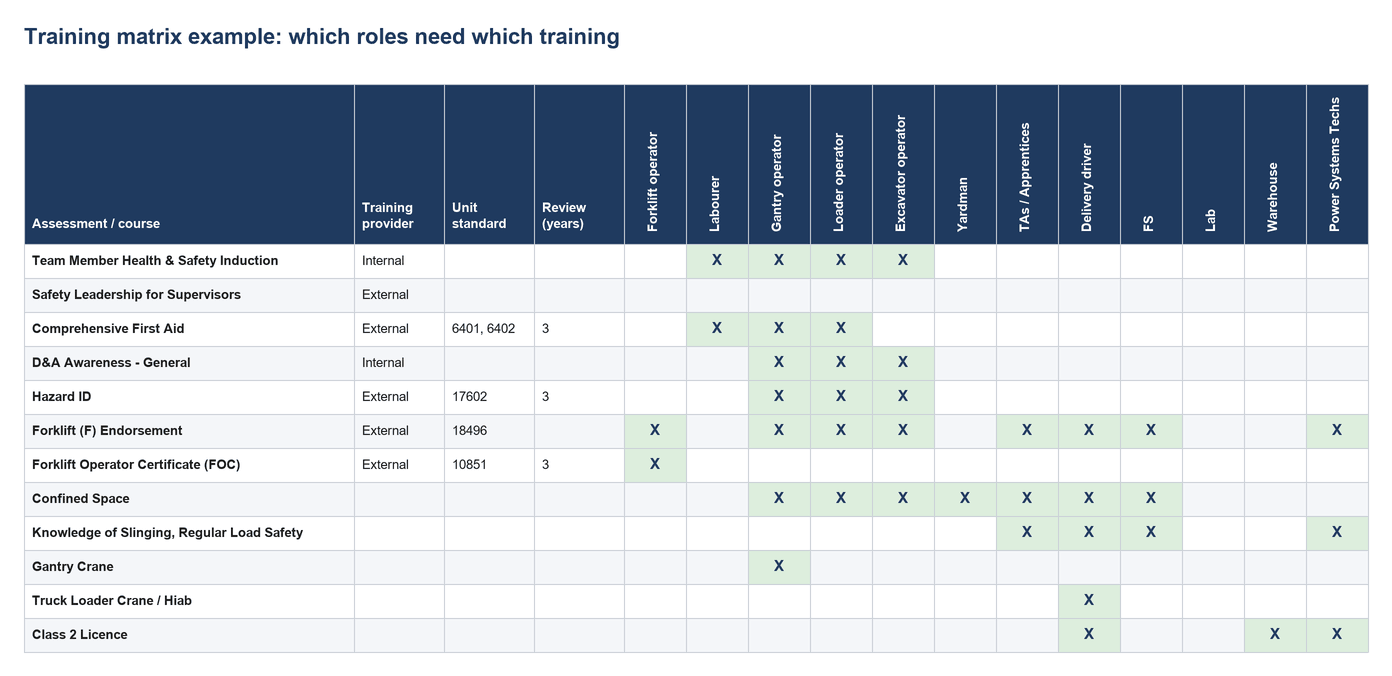
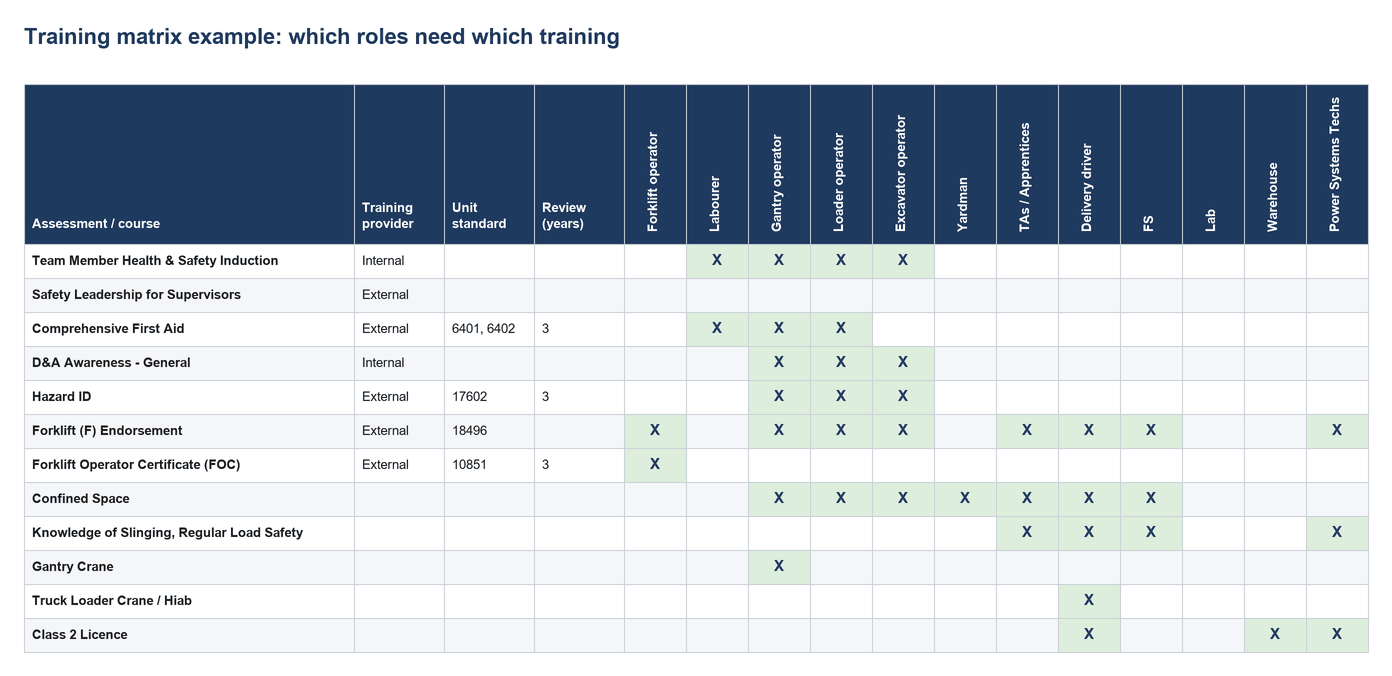
A training matrix is a grid. Across the top are the roles on your sites; down the side are the assessments, tickets, licences and courses your work requires. An X in a cell means that role needs that training. Read down a column and you see everything a forklift operator or a delivery driver must hold; read across a row and you see every role that needs first aid or a Class 2 licence. Auditors, clients and site managers all ask for the same thing in different words, and a training matrix answers all of them.
How CheckSafe helps
What is in the template
Built from a real New Zealand civil and logistics workforce, so it is not a blank grid:
•The training matrix sheet.
Eighteen example roles across the top, from forklift operator, loader operator and excavator operator through delivery driver, warehouse, parts and product managers. Twenty-eight assessments and courses down the side, including Health and Safety Induction, Comprehensive First Aid (unit standards 6401 and 6402), Hazard ID (17602), Forklift Endorsement (18496), Forklift Operator Certificate (10851), Confined Space, Gantry Crane, Truck Loader Crane, Class 2 Licence with Rollers and Wheels endorsements, Spill Response and Certified Handlers. Each row carries the training provider (internal or external), the NZQA unit standard where one applies, and the review period in years.
•The people sheet.
One row per person per course, staff and contractors alike, with completion date, expiry date and a status that colours itself: green is current, orange expires within 60 days, red has lapsed.
•A how-to sheet
with the five steps below.
Training histories for every person, always up to date, exportable when you need. No more chasing paper or tabs.
Matrix Example
Training matrix example
The example matrix: an X where a role needs the course, with provider, unit standard and review period alongside.
How it works
How to fill it in
1. List every role
List every role on your sites across the top. Be specific: "delivery driver" and "loader operator" are different rows in an audit.
2. List assessments
List every assessment, ticket, licence and course down the side, with the provider, the unit standard number and how often it must be renewed.
3. Mark the 'X'
Mark an X where a role requires the course. That is your requirements matrix, and it is what an auditor wants to see first.
4. Add the people
On the people sheet, add every person with their role, then a row for each course they hold, with the completion and expiry dates from the certificates.
5. Monthly reminders
Put a monthly reminder in the calendar to filter the people sheet by EXPIRING and book the training. This is the step that breaks in most businesses.

The matrix
When a spreadsheet stops being enough
The template works well for a small team and a short course list. It stops working when there are dozens of people across several sites, when contractors come and go, and when nobody has time to check the expiry column every week. That is the point where a lapsed ticket goes unnoticed until an auditor, or an incident, finds it. CheckSafe does what the spreadsheet cannot: it warns you before anything expires, attaches the certificates, verifies competence on the job, and produces the reports without anyone rebuilding the matrix. If you are already feeling the strain, book a demo and bring your matrix along.
FAQs about the free training matrix
What is the difference between a training matrix and a skills matrix?
They overlap. A training matrix records which roles need which formal training and tickets, and who has completed them and when they expire. A skills matrix rates how capable people are at tasks, often on a scale, whether or not a formal course was involved. Safety-critical industries need the training matrix for compliance and use a skills matrix for rostering and development. Our skills matrix guide explains how to build one.
What should a training matrix include?
Every role, every required assessment or course for each role, the provider, the unit standard number where there is one, the review period, and then for each person the completion date, the expiry date and where the certificate is filed. The template has all of those columns already.
How often should we update it?
Every time someone completes training or a ticket lapses, and at least monthly as a review. The failure mode is not the format, it is the update discipline, which is why businesses move to software once the matrix grows.
Is the template really free?
Yes. Download it, use it, adapt it. No sign-up wall.
Can CheckSafe import our existing training matrix?
Yes. Bring your spreadsheet to the demo and we will show you how it maps into CheckSafe, so you are not starting from scratch.
Get your free training matrix template
Download the template now, and when it outgrows the spreadsheet, we are in Hamilton and happy to show you the next step.